1. Inventory log sources
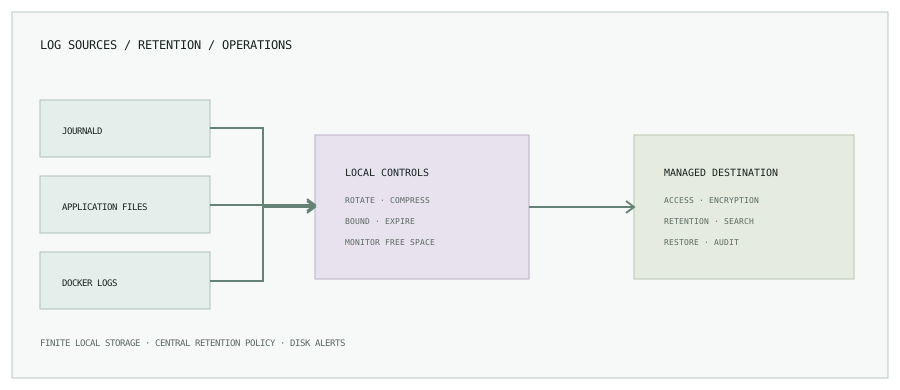
Linux hosts can accumulate logs in the systemd journal, text files under /var/log, application-specific directories, container stdout/stderr, and build tools. First measure each source and identify its owner. Check free bytes and inodes as well as which mount contains the data.
df -h
df -i
journalctl --disk-usage
sudo du -xhd1 /var/log 2>/dev/null | sort -h
2. Set journald retention deliberately
Inspect current journal usage before vacuuming:
journalctl --disk-usageAn operator may remove archived journal files older than two days with:
sudo journalctl --vacuum-time=2dThis deletes older journal data. Two days is only the example requested here, not a universal retention recommendation. Choose a policy that meets incident-response and compliance needs, ensure required logs have been forwarded, and confirm the effect before running a cleanup.
For ongoing control, configure bounded usage in /etc/systemd/journald.conf (for example, SystemMaxUse, SystemKeepFree, and an appropriate retention policy), then validate the exact behavior against your systemd version and disk size.
[Journal]
    SystemMaxUse=1G
    SystemKeepFree=2G
    MaxRetentionSec=14day
These are sample limits, not universal values. Choose them based on filesystem capacity and required history. Apply changes through the host’s configuration-management process, then confirm the journal’s effective usage and service health. Keep enough free space for the OS and application writes.
[Journal]
    SystemMaxUse=1G
    SystemKeepFree=2G
    MaxRetentionSec=14day
These are sample limits, not universal values. Choose them based on filesystem capacity and required history. Apply changes through the host’s configuration-management process, then confirm the journal’s effective usage and service health. Keep enough free space for the OS and application writes.
3. Rotate application log files
Logrotate can rotate, compress, and expire file-based logs. A service-specific example might be placed in /etc/logrotate.d/catalog:
/var/log/catalog/*.log {
    daily
    rotate 14
    missingok
    notifempty
    compress
    delaycompress
    create 0640 catalog adm
}
Adapt path, owner, group, permissions, and retention. Confirm the application handles rotation: it may need to reopen a file after rotation. Test configuration with logrotate --debug first; debug mode reports what would happen without performing rotation. Avoid copytruncate unless the application cannot reopen logs and its data-loss trade-off is understood.
# Preview this rule without rotating files
    sudo logrotate --debug /etc/logrotate.d/catalog
If disk usage does not fall after rotation, check whether the process still has the old file open and whether compression is delayed until the next cycle. Confirm the service’s documented reopen signal or restart behavior before using a post-rotate hook.
# Preview this rule without rotating files
    sudo logrotate --debug /etc/logrotate.d/catalog
If disk usage does not fall after rotation, check whether the process still has the old file open and whether compression is delayed until the next cycle. Confirm the service’s documented reopen signal or restart behavior before using a post-rotate hook.
4. Control application logs
Prefer structured logs sent to a centralized backend, with local buffering bounded by size and age. Avoid logging secrets, access tokens, or unnecessary personal data. Add fields that make logs useful—service, environment, severity, and correlation ID—without placing unbounded values into metric labels or duplicating entire request payloads.
Set a retention and access policy on the central destination as well as the host. A remote logging system is not automatically infinite or free; plan volume, indexing, access, encryption, and expiry.
5. Bound Docker container logs
For Docker’s json-file logging driver, a daemon configuration can set a file count and size cap:
{
  "log-driver": "json-file",
  "log-opts": {
    "max-size": "10m",
    "max-file": "5"
  }
}
Docker daemon log options are strings. Existing containers generally need to be recreated for new settings to take effect; a Docker daemon restart can affect workloads. Roll out the configuration deliberately and verify effective settings on a recreated test container first.
Local rotation protects the host but does not provide durable search or retention by itself. For production, forward logs to an approved backend, monitor the shipper’s buffer, and define what happens when the backend is unreachable. Bound both the local queue and the remote retention period.
Local rotation protects the host but does not provide durable search or retention by itself. For production, forward logs to an approved backend, monitor the shipper’s buffer, and define what happens when the backend is unreachable. Bound both the local queue and the remote retention period.
6. Build a retention policy people can operate
| Source | Retention control | Owner check |
|---|---|---|
| System journal | journald size/free-space limits and planned retention. | Confirm system and audit requirements. |
| Application files | logrotate, application reopen behavior, or direct shipping. | Confirm service user and useful history. |
| Docker logs | Driver options or a managed logging driver. | Confirm containers were recreated with policy applied. |
| Central backend | Index lifecycle, bucket lifecycle, or retention configuration. | Confirm access, encryption, and deletion policy. |
7. Monitor the path to exhaustion
Alert on free bytes, inode use, log growth rate, rotation failures, and central-forwarder health. A full disk can stop applications and logging simultaneously, so keep enough local headroom for the system to recover. Include the mount point and the largest known source in the runbook.
Make log growth predictable.
Related guides: disk-full incident walkthrough and Docker storage troubleshooting.