1. Why infrastructure as code matters
Click-ops can be useful for exploration, but it is difficult to reliably reproduce an environment when configuration lives only in a console or an individual engineer’s memory. Infrastructure as code brings those changes into version control, review, and automated validation.
Terraform describes desired infrastructure and calculates a plan against its state and the provider APIs. It does not remove the need for cloud knowledge: teams still need to understand IAM, networking, data protection, service limits, and the consequences of changing a live resource.
2. A reviewable workflow
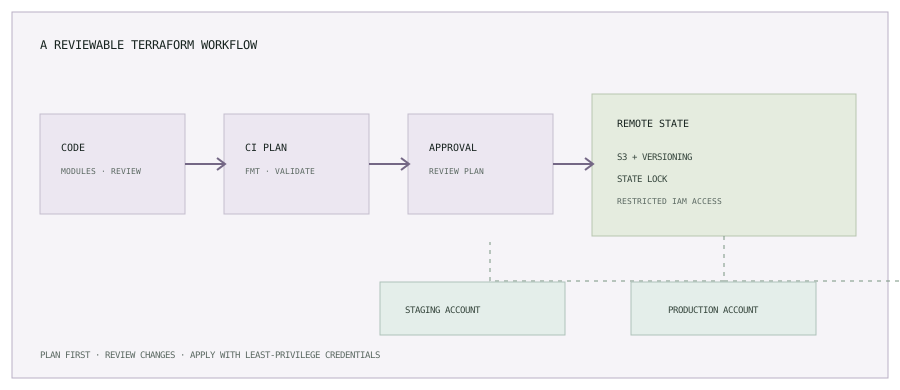
- A developer changes a module or environment configuration in a branch.
- CI runs formatting, initialization, validation, and a plan using a read-oriented identity where possible.
- Reviewers inspect the plan, blast radius, policy results, and any resource replacement or deletion.
- An approved workflow applies the reviewed plan using a narrowly scoped role.
- CI stores a useful audit trail and reports the result without exposing state or credentials.
3. Organize modules around clear ownership
Modules are useful when they package a coherent capability with stable inputs and outputs, such as a service workload, network baseline, or object-storage bucket. Avoid making a module for every resource or hiding important cloud behavior behind too many abstractions.
infrastructure/
  modules/
    service/
    network/
  environments/
    staging/
    production/
  .github-or-ci/
    terraform-plan.yml
A root module should make the environment’s composition understandable. Modules should expose only the inputs teams need and provide outputs that other components can consume. Pin module sources to released versions or immutable Git references; a moving branch makes the same configuration less reproducible.
A small resource example
Use reviewed inputs instead of copying a placeholder AMI into the resource. Image selection, encryption, network placement, and instance profile still need environment-specific controls.
variable "ami_id" {
  type        = string
  description = "Approved machine image ID for this account and region."
}

variable "instance_type" {
  type    = string
  default = "t3.medium"
}

resource "aws_instance" "web" {
  ami           = var.ami_id
  instance_type = var.instance_type

  tags = {
    Name        = "${var.environment}-web"
    Environment = var.environment
    ManagedBy   = "Terraform"
  }
}
4. Protect remote state
Terraform state maps configuration to real objects and may contain sensitive values. A team workflow should not rely on a local state file copied between engineers. Store state remotely with encryption, versioning, access logging where appropriate, and a restricted IAM policy.
For Terraform versions that support S3 lock files, a backend can be configured like this after the state bucket has been provisioned and secured:
terraform {
  required_version = ">= 1.10.0"

  backend "s3" {
    bucket       = "company-terraform-state"
    key          = "services/catalog/production/terraform.tfstate"
    region       = "us-east-1"
    encrypt      = true
    use_lockfile = true
  }
}
This backend block is an example, not a bucket setup recipe. Enable bucket versioning, block public access, restrict state and lock-file permissions, and define recovery and retention procedures. With S3 lock files, the state role needs the corresponding lock-object permissions. Do not have separate pipelines apply the same state concurrently.
terraform.tfstate, plan files, or credentials. A plan file can also contain sensitive values. Restrict CI artifacts, logs, remote-state access, and downloaded plans accordingly.5. Separate environments and permissions
For production systems, separate AWS accounts and state keys make blast radius and access boundaries easier to reason about. A simple layout can use a root configuration per environment, shared versioned modules, and separate backend keys. Each pipeline assumes a role scoped to the target account and resources.
Use environment-specific variable files for non-secret configuration such as sizing or subnet IDs, and inject secrets through a managed secret system only when a provider actually needs them. Terraform state can retain secret values even if a variable is marked sensitive, so state access remains a security boundary.
Terraform workspaces can be useful for multiple instances of the same configuration, but they are not an automatic security or account boundary. Choose the simplest separation model that matches your teams, permissions, and recovery process.
6. Integrate Terraform with CI/CD
A pull request should at minimum check formatting, initialize the configured backend, validate the configuration, and create a reviewable plan. Production apply should be a separate protected step with explicit approval and an identity scoped to production.
terraform fmt -check -recursive
terraform init -input=false
terraform validate
terraform plan -input=false -out=tfplan
In the pull request, summarize additions, changes, replacements, and deletions. Require a second review for destructive changes. Apply the saved plan that was reviewed rather than generating a different plan after approval; expire plans that are stale or whose state has changed.
Prefer short-lived CI credentials, such as an OIDC-based role assumption, over long-lived access keys. Keep provider lock files in version control, pin provider constraints deliberately, and update providers through a reviewed change.
7. Drift, imports, and safe changes
Console changes can create drift between the real environment and configuration. Run scheduled plans for important stacks and route differences to the resource owner. Decide whether to import the change into code, revert it, or document an exception; do not blindly apply a plan that deletes unexpected resources.
When adopting existing infrastructure, import it into state and then align configuration with the actual resource before normal applies. For critical resources, consider lifecycle safeguards such as prevent_destroy, but pair them with a documented replacement and recovery process. A lifecycle guard is not a substitute for review or backups.
8. Team checklist
- Modules have clear inputs, outputs, owners, and versioning.
- Remote state is encrypted, versioned, locked, access-controlled, and recoverable.
- Environments use distinct state and appropriately scoped account roles.
- CI validates and plans on change; a protected approval is required for production apply.
- Reviewers inspect replacements, deletions, security changes, and cost-impacting resource updates.
- Provider versions and modules are updated through tested, reviewable changes.
- State, plans, credentials, and sensitive outputs are kept out of public logs and repositories.
Terraform scales when teams can understand what a change will do, who is allowed to apply it, and how to recover if the result is wrong. The code is only one part of that operating model.
Next: put application changes through a delivery pipeline.
Read A Jenkins CI/CD pipeline for microservices, or browse the engineering notes.