1. Problem statement
Microservices let teams release independently, but without a shared delivery contract, every service can acquire different build steps, security checks, and deployment habits. Manual promotion makes it difficult to answer basic questions: which commit is running, what checks passed, and how do we recover if rollout health is poor?
The pipeline in this guide makes the path explicit for one service. It checks out a commit, runs tests and code analysis, applies a quality gate, creates and scans an immutable image, deploys to staging, and pauses for human approval before production.
2. Jenkins architecture
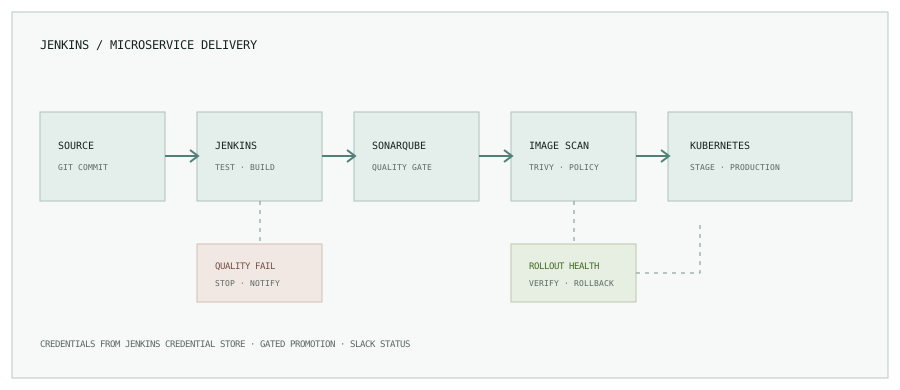
- Controller: stores pipeline definitions, schedules work, and reports run status. Keep heavyweight builds off the controller.
- Agents: provide isolated tools for the workload, such as a Java build agent or an image-build and scan agent.
- Source and registry: Git provides the revision; a container registry stores the immutable image artifact.
- Integrations: SonarQube evaluates code quality, Trivy checks the image, and a Jenkins Slack integration sends run status.
- Deployment: a narrowly scoped identity promotes the image into the target Kubernetes namespace.
3. Pipeline design
Keep stages small enough that a failed check has a clear owner. A typical sequence is:
- Checkout the exact commit and record its revision.
- Run unit tests, package the service, and publish test results.
- Submit analysis to SonarQube and wait for the quality gate.
- Build one container image, scan it, and push it with an immutable tag.
- Deploy that same tag to staging and wait for Kubernetes rollout health.
- Require approval before production, then deploy the same artifact.
- Send success or failure status and link the run to the commit.
Building once and promoting the same digest helps avoid a subtle but common problem: a different image being produced for each environment. For higher assurance, record and deploy the registry digest instead of relying only on a mutable tag.
4. Pipeline as code: Jenkinsfile
The following example assumes a Maven service named catalog, a Jenkins agent labeled linux-docker, configured SonarQube and Slack integrations, Trivy on the image agent, and a multibranch job for branch conditions.
pipeline {
  agent none

  options {
    timestamps()
    disableConcurrentBuilds()
    buildDiscarder(logRotator(numToKeepStr: '30'))
  }

  environment {
    IMAGE_REPOSITORY = 'registry.example.com/catalog'
  }

  stages {
    stage('Test and analyze') {
      agent { label 'linux-maven' }
      steps {
        checkout scm
        sh 'mvn -B clean verify'
        withSonarQubeEnv('sonarqube') {
          sh 'mvn -B sonar:sonar'
        }
      }
      post {
        always {
          junit 'target/surefire-reports/*.xml'
        }
      }
    }

    stage('Quality gate') {
      agent none
      steps {
        timeout(time: 5, unit: 'MINUTES') {
          waitForQualityGate abortPipeline: true
        }
      }
    }

    stage('Build, scan, and push') {
      agent { label 'linux-docker' }
      steps {
        withCredentials([usernamePassword(
          credentialsId: 'registry-push',
          usernameVariable: 'REGISTRY_USER',
          passwordVariable: 'REGISTRY_PASSWORD'
        )]) {
          sh '''
            set -eu
            IMAGE="$IMAGE_REPOSITORY:$BUILD_NUMBER"
            trap 'docker logout registry.example.com >/dev/null 2>&1 || true' EXIT
            printf '%s' "$REGISTRY_PASSWORD" | docker login registry.example.com \\
              --username "$REGISTRY_USER" --password-stdin
            docker build --pull --tag "$IMAGE" .
            trivy image --exit-code 1 --severity HIGH,CRITICAL "$IMAGE"
            docker push "$IMAGE"
            # The EXIT trap logs out after success or failure.
          '''
        }
      }
    }

    stage('Deploy to staging') {
      agent { label 'linux-kubectl' }
      steps {
        withCredentials([file(credentialsId: 'kubeconfig-staging', variable: 'KUBECONFIG')]) {
          sh '''
            set -eu
            kubectl set image deployment/catalog \\
              catalog="$IMAGE_REPOSITORY:$BUILD_NUMBER" -n staging
            kubectl rollout status deployment/catalog -n staging --timeout=180s
          '''
        }
      }
    }

    stage('Approve production') {
      when { branch 'main' }
      steps {
        input message: 'Staging checks passed. Promote this build to production?',
          ok: 'Approve deployment'
      }
    }

    stage('Deploy to production') {
      when { branch 'main' }
      agent { label 'linux-kubectl' }
      steps {
        withCredentials([file(credentialsId: 'kubeconfig-production', variable: 'KUBECONFIG')]) {
          sh '''
            set -eu
            kubectl set image deployment/catalog \\
              catalog="$IMAGE_REPOSITORY:$BUILD_NUMBER" -n production
            kubectl rollout status deployment/catalog -n production --timeout=180s
          '''
        }
      }
    }
  }

  post {
    success {
      slackSend channel: '#deployments', color: 'good',
        message: "SUCCESS: ${env.JOB_NAME} #${env.BUILD_NUMBER} (${env.GIT_COMMIT})"
    }
    failure {
      slackSend channel: '#deployments', color: 'danger',
        message: "FAILED: ${env.JOB_NAME} #${env.BUILD_NUMBER} (${env.GIT_COMMIT})"
    }
  }
}
The EXIT trap logs out of the registry even if the build, scan, or push fails. Prefer an ephemeral or isolated build agent so one job cannot reuse another job’s Docker credentials. The SonarQube Jenkins plugin needs a webhook configured back to Jenkins for waitForQualityGate. The Slack step needs a configured integration. In a real multibranch pipeline, verify how your SCM plugin exposes the commit variable; avoid assuming the same environment variables across all job types.
5. Quality and security checks
mvn clean verify runs the project’s build and tests. The SonarQube quality gate should fail the pipeline when the project’s agreed thresholds are not met; define those thresholds with the team rather than adding an unexplained percentage.
The image scan blocks publication when the configured severity policy is violated. Decide how to handle false positives and unfixable findings: document accepted exceptions with an owner and expiry, keep the scanner database current, and avoid silently skipping scans. Pin or record the produced image digest so the scanned artifact is the artifact that is deployed.
6. Deploy to Kubernetes and verify rollout
The example uses kubectl set image as a compact illustration. Helm or a GitOps controller may be a better fit for your deployment model. Either way, promote the already-built artifact, use health probes and a rollout timeout, and observe error rate and latency after rollout.
Keep staging and production credentials separate. The pipeline should not have unrestricted cluster-admin access. A namespace-scoped deployment role, protected production branch, required review, and manual approval make the production boundary explicit.
7. Rollback strategy
If a rollout fails its health check, stop promotion and inspect the deployment, events, and application logs. A simple imperative rollback for a standard Deployment is:
kubectl rollout undo deployment/catalog -n production
kubectl rollout status deployment/catalog -n production --timeout=180s
Rollback only restores the previous workload revision; it does not reverse database migrations, external side effects, or incompatible messages already processed. Use expand-and-contract schema changes and maintain a tested forward-fix path. For GitOps-managed workloads, revert the declarative change in Git and let the reconciler restore the desired state rather than fighting it with an out-of-band command.
8. Slack notifications that help
Keep notifications concise and actionable: service, environment, commit, result, and a link to the Jenkins run. Notify on actionable failure and completed production deployments; avoid posting credentials, full logs, or noisy updates for every internal stage. Restrict who can trigger production approval and make the approval identity auditable.
9. Production checklist
- Jenkins controller is not used as a general build agent; agents are maintained and isolated.
- Jenkinsfile is reviewed with application code; shared policy belongs in governed pipeline libraries where appropriate.
- Tests, quality gate, and image security policy fail closed when a required integration is unavailable.
- Credentials are stored outside source control, scoped per stage, and rotated.
- Images are immutable or deployed by digest; staging and production use the same build.
- Production promotion is reviewed, observable, and has a rollback or forward-recovery plan.
A good pipeline makes the safe path the repeatable path. Start with a small number of clear gates, measure where delivery stalls, and evolve the shared template as teams learn.
Next: make infrastructure changes reviewable too.
Read Terraform workflows that scale past one environment, or browse the engineering notes.