1. Start with the monitoring challenge
Common problems include metrics scattered across systems, dashboards without service ownership, alert floods, missing retention planning, and teams learning about an incident from customers. Define the questions first: Is the service available? Are users seeing latency or errors? Is capacity close to exhaustion? Can an on-call engineer find the relevant evidence?
2. Prometheus architecture
Prometheus periodically scrapes HTTP metrics endpoints. Targets can be discovered statically or through service discovery; exporters expose metrics for systems that do not instrument themselves. Prometheus stores time series locally and evaluates recording and alerting rules. Alertmanager groups, deduplicates, routes, silences, and inhibits alerts. Grafana queries Prometheus to render dashboards.
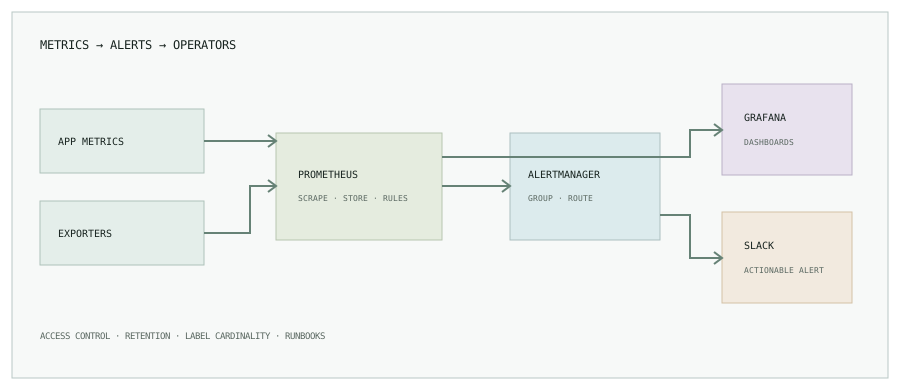
- Application instrumentation: expose request rate, error count, and latency histograms with bounded labels.
- Exporters: expose host, database, or platform metrics through a known scrape target.
- Prometheus: scrape, store, query, and evaluate rules.
- Grafana: combine related signals into an operational view with useful links and time ranges.
- Alertmanager: route actionable alerts to the right team and group related notifications.
3. A safe Kubernetes deployment baseline
Pin the chart version, review its values, and store configuration in version control. The example command below shows the installation shape only; it is not a production-ready values file.
helm repo add prometheus-community \
  https://prometheus-community.github.io/helm-charts
helm repo update
helm show values prometheus-community/kube-prometheus-stack \
  --version <reviewed-chart-version> > upstream-values.yaml

# Review and customize values before installing or upgrading.
helm upgrade --install monitoring \
  prometheus-community/kube-prometheus-stack \
  --namespace monitoring --create-namespace \
  --version <reviewed-chart-version> \
  --values values.yaml --dry-run
Set storage requests, retention, resource limits, scrape scope, network access, and RBAC intentionally. Avoid exposing Prometheus or Grafana publicly without authentication and an approved access path. Back up dashboards and rule configuration as code.
4. Build useful alert rules
Prefer symptoms that relate to user impact. This example alerts when the measured five-minute server error ratio exceeds a threshold for a sustained period. Make sure the metric and labels match your instrumentation before adopting it.
groups:
  - name: service-symptoms
    rules:
      - alert: ElevatedServerErrorRatio
        expr: |
          sum(rate(http_requests_total{status=~"5.."}[5m]))
          / clamp_min(sum(rate(http_requests_total[5m])), 1e-9)
          > 0.05
        for: 10m
        labels:
          severity: page
        annotations:
          summary: "Elevated server error ratio"
          runbook: "https://runbooks.example/service-errors"
Pair alerts with an owner, a runbook, a meaningful duration, and clear response expectations. Alerts that cannot lead to action should usually be dashboards or logs instead. Review false positives and alert volume after rollout.
5. Design dashboards for a decision
A service overview can show request rate, error ratio, latency percentiles, saturation, and deployment markers. A capacity dashboard can show CPU and memory requests versus use, pending pods, node pressure, and storage. Add links from a panel to the relevant logs, traces, runbook, or deployment. The sample below is a layout sketch, not live telemetry.

6. Route Alertmanager notifications to Slack
Create a Slack app or incoming webhook using your organization’s approved process, restrict the channel, and keep the webhook URL in a secret file or secret manager. Do not put it in a Git repository, dashboard, alert annotation, or public support transcript.
receivers:
  - name: platform-slack
    slack_configs:
      - api_url_file: /etc/alertmanager/secrets/slack_webhook_url
        channel: "#platform-alerts"
        send_resolved: true
        title: '{{ .CommonLabels.alertname }}'
        text: '{{ .CommonAnnotations.summary }}'
Validate supported configuration fields against the Alertmanager version you deploy. Use grouping and routing labels to avoid sending every replica’s duplicate alert as a separate message. Test notification delivery and the resolved path.
7. SRE practices that keep monitoring useful
- Start from service objectives and error budgets, then instrument the signals that represent them.
- Keep metric label cardinality bounded; do not use user IDs, request IDs, or arbitrary URLs as labels.
- Set retention and storage from measured ingest rate, replication, and recovery needs.
- Use separate access roles for viewing, editing, and administering observability tools.
- Review alerts after incidents: remove noise and add missing actionable context.
- Test Prometheus, Alertmanager, dashboards, and backup restoration as operational components.
Monitoring should shorten the path from symptom to decision.
Continue with the Kubernetes troubleshooting guide, or browse all engineering notes.