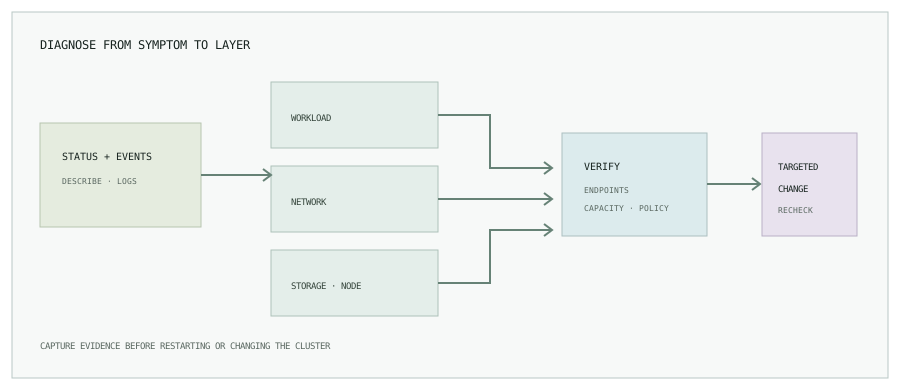
A repeatable first five minutes
kubectl config current-context
kubectl get pods -A -o wide
kubectl get events -A --sort-by=.lastTimestamp
kubectl describe pod <pod> -n <namespace>
kubectl logs <pod> -n <namespace> --all-containers=true
kubectl top pod -n <namespace>
Use --previous when the current container has restarted and you need its prior log. Compare pod events, controller status, node placement, resource requests, and recent rollout history. Record timestamps and object names as you investigate.
1–5. Pod startup and scheduling
| Symptom | What to inspect | Common next check |
|---|---|---|
| 1. CrashLoopBackOff | Exit code, previous container logs, events, probe failures. | kubectl logs <pod> -n <ns> --previous; inspect app config and startup probes. |
| 2. ImagePullBackOff | Image name/tag, registry reachability, imagePullSecrets, pull event. | Confirm the image exists and the service account can use the expected pull secret. |
| 3. OOMKilled | Container last state, memory limit, usage trend, recent workload changes. | Compare kubectl top pod with the limit; profile heap or cache before raising it. |
| 4. Pending pod | Scheduler event, requests, node allocatable, taints, affinity, PVC status. | Check whether any eligible node can fit the request and placement rules. |
| 5. CreateContainerConfigError | Missing Secret or ConfigMap, invalid key references, mount configuration. | Describe the pod and verify referenced objects exist in the same namespace. |
6–10. Service discovery and traffic
| Symptom | Layer to check | Useful evidence |
|---|---|---|
| 6. DNS lookup fails | Pod resolver, CoreDNS pods and logs, service name and namespace. | Check the pod resolver and CoreDNS health with authorized diagnostics. |
| 7. Service has no endpoints | Service selector, pod labels, readiness state. | kubectl get endpointslice -n <ns> and compare labels exactly. |
| 8. Ingress returns 404 | Ingress class, host/path rules, controller logs, matching service port. | Confirm DNS reaches the controller and the rule matches the requested host and path. |
| 9. Ingress returns 502/503 | Backend endpoints, readiness, service target port, upstream protocol. | Trace the route from ingress to Service to ready endpoints. |
| 10. NetworkPolicy blocks traffic | Namespace policies, pod selectors, ingress and egress rules. | Check both source egress and destination ingress policy for the required port. |
11–12. Persistent storage
| Symptom | What to inspect | Safe next step |
|---|---|---|
| 11. PVC Pending | StorageClass, requested size/access mode, provisioner events, quota. | Check provisioner and storage-region constraints before modifying the claim. |
| 12. MountVolume error | PV/PVC binding, attach limits, node events, filesystem and CSI driver status. | Inspect CSI controller and node-plugin health; do not manually alter provider disks. |
13–15. Health, rollout, and cluster capacity
| Symptom | What to inspect | Next check |
|---|---|---|
| 13. Node NotReady | Node conditions, kubelet events, resource pressure, CNI and cloud health. | kubectl describe node <node>; compare with provider and system telemetry. |
| 14. Readiness probe failing | Probe path, port, delay, response, container startup time. | Inspect app health endpoint and probe events; don’t simply lengthen all probes. |
| 15. Rollout stalled | Deployment conditions, ReplicaSet events, unavailable replicas, PDBs. | kubectl rollout status deployment/<name> -n <ns> and inspect the new pods. |
Useful inspection commands
# Object state and scheduling events
kubectl describe pod <pod> -n <namespace>

# Current container logs
kubectl logs <pod> -n <namespace> --all-containers=true

# Logs from the previous container instance
kubectl logs <pod> -n <namespace> --previous

# Current resource usage (requires metrics API)
kubectl top pod -n <namespace>
These commands may expose internal names or log data. Follow your organization’s access and data-handling rules when sharing output.
Example: trace a CrashLoopBackOff
- Confirm the active context and namespace; capture the pod’s
describeoutput and recent events. - Read the previous container log because the current instance may have restarted before you connected.
- Check the container’s last exit code, command, environment references, mounted configuration, and startup or liveness probe events.
- Compare actual memory use and configured limits if the last state is
OOMKilled; inspect node pressure if several workloads fail together. - Make one scoped change, observe a new rollout, and verify readiness plus the service’s user-facing health signals.
Do not increase every probe delay or memory limit as a reflex. Confirm the failure mode first: a bad configuration, missing dependency, invalid image, or real resource shortage needs a different remedy.
Avoid the reset-first trap
Deleting a pod can temporarily hide the evidence and may not fix a controller, image, quota, storage, or node problem. Capture describe output and events first; preserve logs from the failed instance; then test a targeted change and verify the service recovers.
Turn recurring symptoms into useful signals.
Read Building a Prometheus and Grafana monitoring stack, or browse all engineering notes.