1. Start with the actual starting point
For a typical EKS service, the bill is a combination of more than node count. It can include EC2 capacity, EBS volumes, load balancers, data transfer, NAT gateways, logging, and the EKS control plane. Some costs are shared by multiple teams or clusters. A useful first step is to line up three views for the same period: the AWS bill, Kubernetes workload allocation, and actual utilization.
A common baseline to investigate is a fixed managed node group sized for peak demand, with workloads requesting much more CPU or memory than they usually consume. That is a diagnostic pattern, not a claim about a specific cluster. Look for low node utilization, pending pods, high unused requests, forgotten volumes and load balancers, and shared network charges that are not assigned to a team.
2. Find the cost drivers before changing capacity
- Over-requested resources: scheduling reserves what a pod requests, even when its average use is much lower.
- Static node groups: a minimum set too high can leave paid capacity idle; a minimum too low can create slow or unsafe scale-up.
- Unbalanced workload placement: fragmentation can strand capacity across nodes even when aggregate cluster use looks reasonable.
- Non-compute charges: EBS, load balancers, NAT traffic, data transfer, and log ingestion may be material.
- Unallocated shared spend: cluster-wide components need an agreed allocation method so teams can act on their share.
Compare a full billing window rather than one quiet afternoon. Separate steady-state and peak periods, and record a baseline for cost per service, cost per request, and utilization. If you skip measurement, later savings can be difficult to distinguish from lower traffic.
3. Right-size requests and limits carefully
Requests inform scheduler placement and the resource reservations used by cluster capacity planning. CPU limits throttle execution; memory limits can result in an OOM kill if a container exceeds its allocation. These are different controls and should not be set to the same arbitrary value for every workload.
resources:
  requests:
    cpu: "250m"
    memory: "256Mi"
  limits:
    cpu: "1"
    memory: "512Mi"
This manifest is illustrative, not a recommended size for your service. Use historical CPU and memory data, representative load tests, and an understanding of burst behavior. Start with request values that cover normal demand with an agreed margin, then set limits based on how the application behaves under load. For memory-sensitive services, an overly tight limit can turn a cost change into an availability incident.
Review requests by workload and environment. Use workload metrics and Kubernetes recommendations as an input, not an automatic production change. Roll updates out gradually and watch throttling, restarts, latency, and pending pods.
4. Match the node autoscaler to the operating model
Horizontal Pod Autoscaler adjusts pod replicas based on configured metrics; a node autoscaler provides capacity when pods cannot be scheduled and can remove underused nodes. These operate at different layers. Cluster Autoscaler and Karpenter are two ways to manage node capacity.
| Approach | Useful when | Trade-off to plan for |
|---|---|---|
| Cluster Autoscaler | You use compatible node groups or managed node groups and want a familiar group-based scaling model. | Scaling choices are constrained by the configured groups and their instance types. |
| Karpenter | You want Kubernetes workload requirements to drive more flexible node provisioning and consolidation. | Requires careful NodePool limits, compatible node classes, IAM, disruption budgets, and lifecycle monitoring. |
Choose one node-provisioning control path per capacity pool unless you have deliberately designed how controllers cooperate. Prevent two autoscalers from competing over the same nodes. Keep minimum and maximum capacity, disruption policy, and workload constraints visible in code review.
A Karpenter NodePool sketch
This is a starting point for discussion, not a complete deployable configuration. It assumes a separately defined and tested EC2NodeClass, an installed Karpenter version compatible with the API, and appropriate permissions.
apiVersion: karpenter.sh/v1
kind: NodePool
metadata:
  name: general
spec:
  template:
    spec:
      nodeClassRef:
        group: karpenter.k8s.aws
        kind: EC2NodeClass
        name: general
      requirements:
        - key: karpenter.sh/capacity-type
          operator: In
          values: ["spot", "on-demand"]
      expireAfter: 720h
  limits:
    cpu: "1000"
  disruption:
    consolidationPolicy: WhenEmptyOrUnderutilized
    consolidateAfter: 1m
Consolidation can evict pods and change capacity; combine it with PodDisruptionBudgets, topology constraints, adequate headroom, and staged observation. Set resource limits for each pool and make the on-demand fallback intentional.
5. Use Spot capacity only where interruption is tolerable
EC2 Spot can lower compute cost for workloads that can tolerate replacement. It is not simply a cheaper default for every node. Good candidates are often stateless workers, retryable batch tasks, and horizontally scaled services with enough replicas. Stateful or interruption-sensitive services usually need a different placement and recovery design.
- Mix several compatible instance families and sizes to improve capacity choice.
- Keep critical replicas on on-demand capacity or define a deliberate mixed-capacity policy.
- Use disruption budgets and graceful termination handling; test what happens to in-flight work.
- Alert on pending pods, node churn, interruption events, and changes in service latency or error rate.
- Review the full cost, including replacement capacity, storage, and data movement.
6. Allocate and monitor costs with Kubecost
Kubecost can help teams connect Kubernetes allocations to namespaces, workloads, and labels. It complements AWS billing; it does not replace it. Validate its allocation against your AWS Cost and Usage Report or Cost Explorer and agree how to distribute shared items such as control plane, network, and system workloads.
Useful views include cost by namespace, workload efficiency, idle capacity, and cost over time. Add a budget or alert for unexpected movement, then attach ownership to the labels those reports depend on. A dashboard without accountable owners tends to become another screen no one checks.
7. Compare architectures, not just instance prices
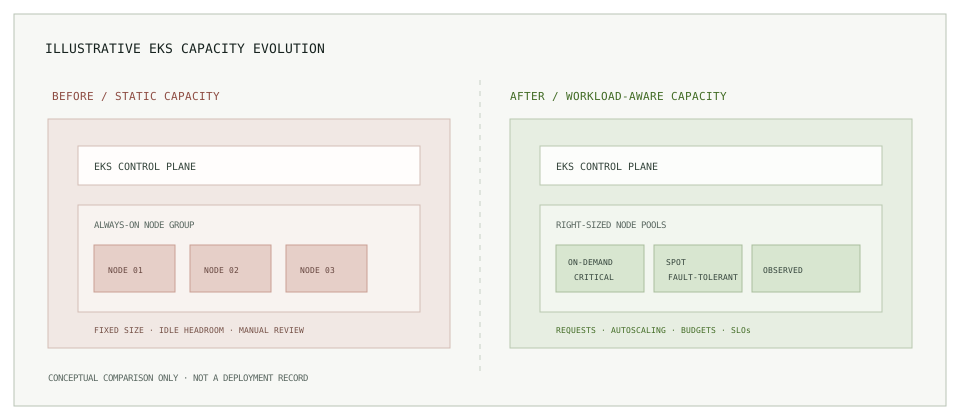
In the static model, node groups sized for peak demand can leave idle headroom between peaks. In the target model, accurate requests, workload scaling, bounded node provisioning, a suitable capacity mix, and service-level monitoring inform one another. The control plane and non-compute services remain part of the cost model in both designs.
8. Read cost comparisons with context
The following chart normalizes an overall infrastructure comparison to an index of 100 before and 60 after a reported 40% reduction. It is included to explain the math and is not an EKS-only result or a category-level AWS bill comparison.
To publish a real cluster comparison, use matching date ranges and comparable traffic. Include the same cost categories on both sides, state how shared costs were allocated, and annotate application or architecture changes that affect demand.
9. Lessons that last longer than a price change
- Establish a measured baseline before adjusting requests or node capacity.
- Optimize for cost per reliable workload, not utilization in isolation.
- Right-sizing, autoscaling, and interruption handling should be tested with service owners.
- Keep budgets, limits, disruption policies, and ownership in reviewable configuration.
- Track availability, latency, error rate, and recovery alongside spend.
Cost optimization is an operating discipline, not a one-off cluster cleanup. Better requests and workload-aware capacity make a difference only when teams can see the result and protect service objectives.
Next: put infrastructure changes through review.
Read Terraform workflows that scale past one environment, or browse the engineering notes.