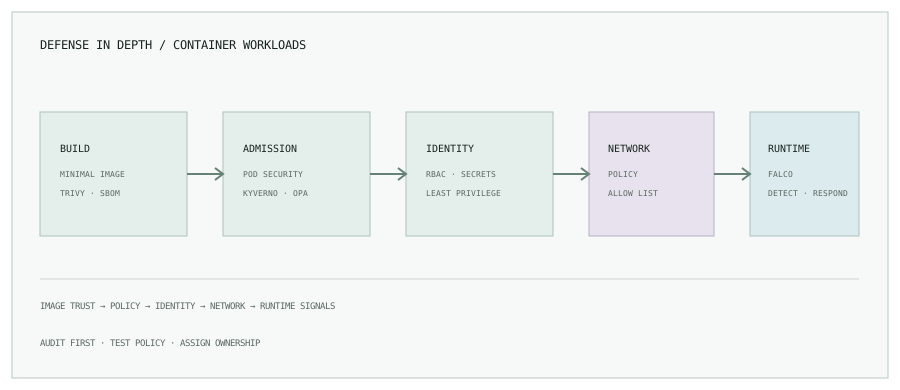
1. Secure the lifecycle, not just the cluster
Container security spans source dependencies, image build, registry, cluster identity, workload configuration, network paths, and runtime behavior. A control added late cannot reliably compensate for an image with unknown contents or a workload with broad permissions.
- Use minimal, maintained base images and rebuild when dependencies or base layers need updates.
- Scan images before promotion and define how teams handle severity, fix availability, and documented exceptions.
- Deploy immutable image references and restrict registry write access.
- Keep the Kubernetes API and observability endpoints behind authenticated, approved access paths.
2. Scan images with Trivy
Run a vulnerability scan during CI and publish the result with the build. Agree which findings block a release; image scanning reports issues but does not establish that an image is safe.
trivy image \
  --severity HIGH,CRITICAL \
  --exit-code 1 \
  registry.example.com/catalog:<immutable-tag>
Keep scanner data current, scan the final image that will be deployed, and track accepted exceptions with an owner and expiry. Avoid placing registry credentials in command-line arguments or logs.
3. Apply Pod Security Standards
Kubernetes Pod Security Admission can enforce the built-in restricted profile at namespace boundaries. Start new or changed namespaces in audit or warn mode to discover incompatible workloads, then move to enforcement with an agreed remediation plan.
apiVersion: v1
kind: Namespace
metadata:
  name: payments
  labels:
    pod-security.kubernetes.io/audit: restricted
    pod-security.kubernetes.io/warn: restricted
    pod-security.kubernetes.io/enforce: baseline
Pin the policy version to your cluster version where required. The example uses baseline enforcement while surfacing stricter restricted-profile findings; it is not equivalent to enforcing restricted. Progress after testing actual pods.
4. Reduce workload privileges
Use a dedicated service account and disable token mounting when the workload does not need the Kubernetes API. Run as a non-root user, drop Linux capabilities, use a runtime-default seccomp profile, and make the root filesystem read-only when the application supports it.
apiVersion: v1
kind: Pod
metadata:
  name: catalog
spec:
  securityContext:
    runAsNonRoot: true
    runAsUser: 10001
    seccompProfile:
      type: RuntimeDefault
  containers:
    - name: app
      image: registry.example.com/catalog:1.0.0
      securityContext:
        allowPrivilegeEscalation: false
        readOnlyRootFilesystem: true
        capabilities:
          drop: ["ALL"]
This Pod spec is illustrative; replace the image with a reviewed immutable digest and add the workload’s ports, resources, probes, service account, and any explicitly required writable mounts. Test the application before rolling out restrictive settings.
5. Use least-privilege RBAC
Bind service accounts to roles that grant only the specific verbs and resources required within the intended namespace. Avoid using the default service account for unrelated workloads and avoid giving application pods cluster-admin. Review permissions periodically and remove unused bindings.
Secrets should come from a managed secret system or an approved encrypted Kubernetes secret workflow. Enable encryption at rest for the Kubernetes datastore, restrict who can read secrets, rotate credentials, and never write secret values into manifests, images, CI logs, or Git history.
6. Limit network paths
NetworkPolicy can restrict pod ingress and egress when the cluster networking plugin enforces it. Begin with a map of required DNS, service, and external dependencies; test policies in a representative namespace and monitor denied connections before expanding enforcement.
A default-deny policy without explicit allow rules may break DNS, health checks, telemetry, or downstream services. Keep exceptions narrow, owned, and reviewed rather than adding broad catch-all access.
7. Admission policy and runtime visibility
| Tool | Typical role | Operational consideration |
|---|---|---|
| Kyverno | Kubernetes-native validation, mutation, and generation policies. | Start in audit mode, test policy changes, and observe admission failures. |
| OPA Gatekeeper | Constraint-based admission policies with policy-as-code. | Track template and constraint versions; avoid unexplained exceptions. |
| Falco | Runtime detection from system activity and rules. | Tune detections and route actionable events with workload context. |
Policy engines prevent or report configuration patterns. Falco observes runtime behavior. These tools serve different stages; define an owner and response path for each finding so alerts do not disappear into an untriaged queue.
8. Production checklist
- Build and scan images in CI; promote an immutable artifact.
- Run workloads non-root with minimum capabilities and explicit resource limits.
- Enforce appropriate Pod Security controls after a warning and remediation period.
- Restrict service-account tokens, Kubernetes API permissions, and secret access.
- Use tested network policies and review admission policy changes.
- Monitor runtime events and vulnerability remediation with accountable owners.
Make the secure path the easy path.
Read the Jenkins pipeline guide, or browse all engineering notes.