1. GitOps fundamentals
GitOps describes an operating model where desired infrastructure and application state is declared, versioned, reviewed, and reconciled by automation. Engineers propose changes as commits or pull requests. A controller observes the configured source and reports differences from the live cluster.
- Declarative state: configuration describes the intended result.
- Version history: changes have authors, reviews, and diffs.
- Reconciliation: a controller compares desired and observed state.
- Controlled access: teams change desired state through the approved repository workflow.
2. How Argo CD connects to Kubernetes
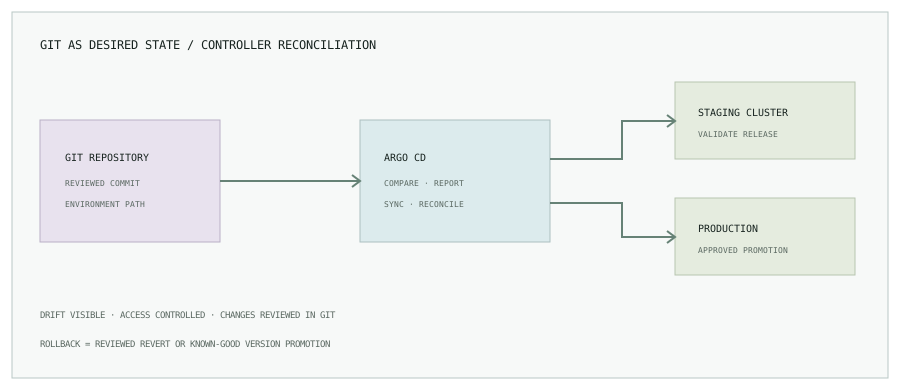
Argo CD runs in Kubernetes and can observe configured repositories. Application definitions specify a source repository and path, target revision, destination cluster and namespace, and synchronization behavior. The controller needs network, repository, and Kubernetes permissions appropriate to the design.
3. Installation and first application
Install Argo CD using the official documentation for a pinned, supported release. Choose a namespace, storage and resource sizing, TLS and authentication, ingress or private access, and backup strategy. Do not expose the initial administrator interface publicly as a shortcut.
A basic Application manifest might look like this. The Git URL, path, branch, project, cluster, and namespace are placeholders and must match your repository layout and policy.
apiVersion: argoproj.io/v1alpha1
kind: Application
metadata:
  name: catalog-staging
  namespace: argocd
spec:
  project: catalog
  source:
    repoURL: https://git.example.com/platform/apps.git
    targetRevision: main
    path: environments/staging/catalog
  destination:
    server: https://kubernetes.default.svc
    namespace: catalog-staging
  syncPolicy:
    automated:
      selfHeal: true
      prune: false
    syncOptions:
      - CreateNamespace=true
selfHeal lets Argo CD reconcile many live changes back to the declared state. With prune: false, removed resources are not automatically deleted during sync; teams can enable pruning only after understanding its impact and review controls. Avoid combining a broad source path and automatic prune without a tested deletion policy.
4. Promote through environments
Keep application manifests reusable and make environment-specific configuration explicit. A common pattern separates base templates from overlays or values for development, staging, and production. Use pull requests to promote a reviewed image tag or digest and to adjust environment settings.
- CI tests the change, builds and scans an immutable image, then publishes its digest.
- A reviewed Git change points the development environment to that digest.
- After validation, a second change promotes the same artifact to staging.
- Production promotion uses its own approvals and access policy; it should not rebuild a different image.
Protect production branches, require reviews, and restrict who can change Application sources or destinations. Avoid storing plaintext secrets in a Git repository; use an approved secret-management integration or encrypted secret workflow.
5. Self-healing, sync windows, and drift
Argo CD can report Synced when desired and live resources match, and Healthy when configured health checks pass. These are useful signals but do not guarantee that users see a healthy service; include application-level metrics, synthetic checks, and rollout verification.
Self-healing can correct an out-of-band change, but it may also revert an emergency edit. Keep a break-glass process documented and ensure responders reconcile the fix back into Git. Sync windows can limit automated changes during sensitive periods, but the window configuration itself needs ownership and review.
6. Roll back through Git
For a GitOps-managed application, rollback normally means reverting the commit that changed desired state or promoting a known-good image digest through a new reviewed commit. Argo CD reconciles the cluster to that version. This keeps the audit history coherent and avoids leaving live state different from Git.
Before rollback, consider database compatibility, persistent data changes, and messages already processed. A manifest rollback cannot reverse an irreversible migration or external side effect. Use backward-compatible changes, staged promotion, and a tested forward-fix path.
7. Operational checklist
- Pin supported controller and chart versions; plan upgrades.
- Restrict UI/API access, repository credentials, project scopes, and cluster permissions.
- Use separate projects and destinations for environment boundaries.
- Keep secrets out of plaintext manifests and commit history.
- Review automated sync, self-heal, and prune behavior per application.
- Alert on sync failures, health degradation, and repository credential expiry.
- Maintain a break-glass process and reconcile emergency changes into Git.
Make each deployment traceable to a reviewed change.
Pair this with Jenkins CI/CD for microservices, or browse all engineering notes.