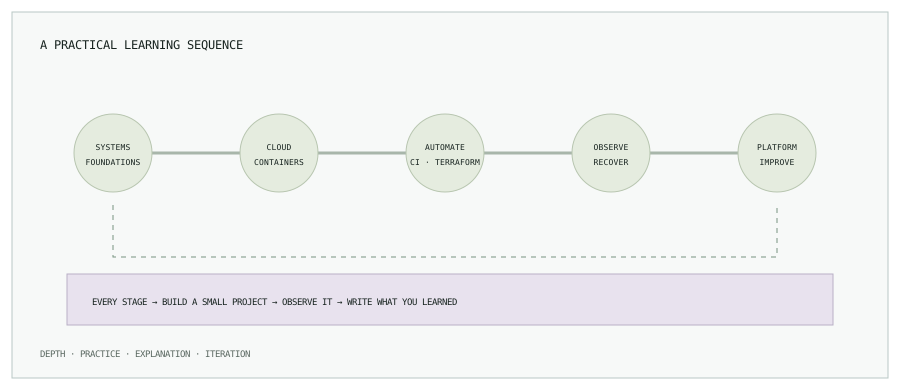
1. Start with systems fundamentals
Linux: users and permissions, processes, filesystems, systemd, logs, packages, and resource limits. Practice tracing a service from process to socket to log rather than memorizing command lists.
Networking: DNS, TCP, TLS, routing, subnets, firewalls, and load balancing. Be able to explain what happens between a client request and an application process, and use tools such as dig, curl, ss, and traceroute in an authorized lab.
2. Learn one cloud platform deeply
Pick a primary provider. On AWS, practice IAM roles and policies, VPC routing, EC2, S3, RDS, load balancing, autoscaling, CloudWatch, and cost allocation. Learn identity and networking before collecting service names. Create and destroy a small sandbox safely and understand what continues billing.
3. Containerize, then orchestrate
Learn Dockerfiles, layers, registries, resource limits, networking, and persistent storage first. Then learn Kubernetes objects, scheduling, services, ingress, probes, resource requests, RBAC, network policy, and troubleshooting. A local cluster is useful for study; a production cluster introduces identity, upgrade, networking, storage, and availability decisions.
4. Automate infrastructure and delivery
Build Terraform skills around modules, state, plans, review, and environment boundaries. For CI/CD, understand pipeline-as-code, test feedback, artifact immutability, secrets, approvals, and rollback. Learn GitOps with ArgoCD after you understand the desired-state and reconciliation model.
5. Operate what you deploy
Study metrics, logs, and traces as complementary signals. Prometheus and Grafana are useful for metrics and dashboards; Alertmanager routes alerts. Practice defining a service-level indicator, building one actionable alert, attaching a runbook, and verifying backup restoration. Measure latency, error rate, saturation, and recovery—not dashboard count.
6. Grow toward platform engineering
Platform work combines infrastructure, developer experience, reliability, security, and product thinking. Look for repeated team friction, create a paved path with safe defaults, measure adoption and time-to-delivery, and treat the platform as something with users and support obligations.
7. Use AI in DevOps with guardrails
AI can help explain unfamiliar logs, draft tests, summarize configuration, and generate a first-pass runbook. Treat its output as a suggestion: verify commands and infrastructure plans, protect customer data and secrets, keep human approval for production changes, and evaluate whether the tool actually reduces toil or incident risk.
8. Build evidence, not just a list of tools
- Provision a small cloud environment with Terraform, reviewed plans, and remote state.
- Build a container image, scan it, and deploy to a local or sandbox Kubernetes cluster through CI.
- Add metrics, a dashboard, and one alert tied to a documented failure mode.
- Write a recovery runbook and test restoring a backup or rolling back a deployment.
- Publish a short design note: constraints, trade-offs, what you measured, and what you would change next.
A useful checkpoint is whether another engineer can reproduce the result from your repository, understand the deployment path, and follow your recovery instructions without guessing. Keep credentials out of the project and tear down paid cloud resources when the exercise is complete.
A six-month sequence to adapt
| Focus | Practice | Checkpoint |
|---|---|---|
| Weeks 1–4: Linux and networking | Run a small service, inspect logs, processes, DNS, and listening sockets. | Explain a request path and diagnose a deliberately broken local service. |
| Weeks 5–8: Cloud and identity | Provision a small sandbox network and compute role with infrastructure as code. | Show a reviewed plan, scoped permissions, and a safe teardown. |
| Weeks 9–12: Containers and Kubernetes | Containerize the service and deploy it locally with probes and resource requests. | Explain scheduling, service discovery, storage, and a failure you diagnosed. |
| Weeks 13–16: CI/CD and GitOps | Test, scan, build once, and promote an immutable artifact through environments. | Show approval, deployment status, and a tested rollback path. |
| Weeks 17–20: Observability and recovery | Add service metrics, one useful alert, a runbook, and a backup restore exercise. | Demonstrate how you move from symptom to diagnosis and recovery. |
| Weeks 21–24: Platform focus | Improve one repeated developer task and measure whether the workflow got easier. | Document users, constraints, adoption, and what you would improve next. |
This sequence is a planning aid, not a promise that a fixed number of weeks makes someone job-ready. Adjust it for your background, available study time, and the role you are targeting.
A useful checkpoint is whether another engineer can reproduce the result from your repository, understand the deployment path, and follow your recovery instructions without guessing. Keep credentials out of the project and tear down paid cloud resources when the exercise is complete.
A six-month sequence to adapt
| Focus | Practice | Checkpoint |
|---|---|---|
| Weeks 1–4: Linux and networking | Run a small service, inspect logs, processes, DNS, and listening sockets. | Explain a request path and diagnose a deliberately broken local service. |
| Weeks 5–8: Cloud and identity | Provision a small sandbox network and compute role with infrastructure as code. | Show a reviewed plan, scoped permissions, and a safe teardown. |
| Weeks 9–12: Containers and Kubernetes | Containerize the service and deploy it locally with probes and resource requests. | Explain scheduling, service discovery, storage, and a failure you diagnosed. |
| Weeks 13–16: CI/CD and GitOps | Test, scan, build once, and promote an immutable artifact through environments. | Show approval, deployment status, and a tested rollback path. |
| Weeks 17–20: Observability and recovery | Add service metrics, one useful alert, a runbook, and a backup restore exercise. | Demonstrate how you move from symptom to diagnosis and recovery. |
| Weeks 21–24: Platform focus | Improve one repeated developer task and measure whether the workflow got easier. | Document users, constraints, adoption, and what you would improve next. |
This sequence is a planning aid, not a promise that a fixed number of weeks makes someone job-ready. Adjust it for your background, available study time, and the role you are targeting.
9. Free learning resources
- Linux Journey for Linux fundamentals.
- AWS documentation and AWS Skill Builder for cloud concepts and hands-on training.
- Docker getting started for image and container foundations.
- Kubernetes tutorials and official documentation.
- HashiCorp Terraform tutorials.
- Jenkins documentation and Argo CD documentation.
- Prometheus documentation and Grafana documentation.
Documentation and tutorials are free to read, but cloud labs, certification exams, and some hosted services may cost money. Prefer local tools or budget-limited sandboxes, set billing alerts, and verify resource teardown after each exercise.
Documentation and tutorials are free to read, but cloud labs, certification exams, and some hosted services may cost money. Prefer local tools or budget-limited sandboxes, set billing alerts, and verify resource teardown after each exercise.
A sustainable study rhythm
Choose one focus area for a few weeks. Spend time reading, building, and troubleshooting; finish each cycle with a working artifact and a short explanation. Review progress against the role you want, and revisit fundamentals whenever a project exposes a gap.
Make each new tool answer a real problem.
Browse all engineering notes for focused guides on Kubernetes, Terraform, CI/CD, and operations.